Note
Click here to download the full example code
Centroid Layout
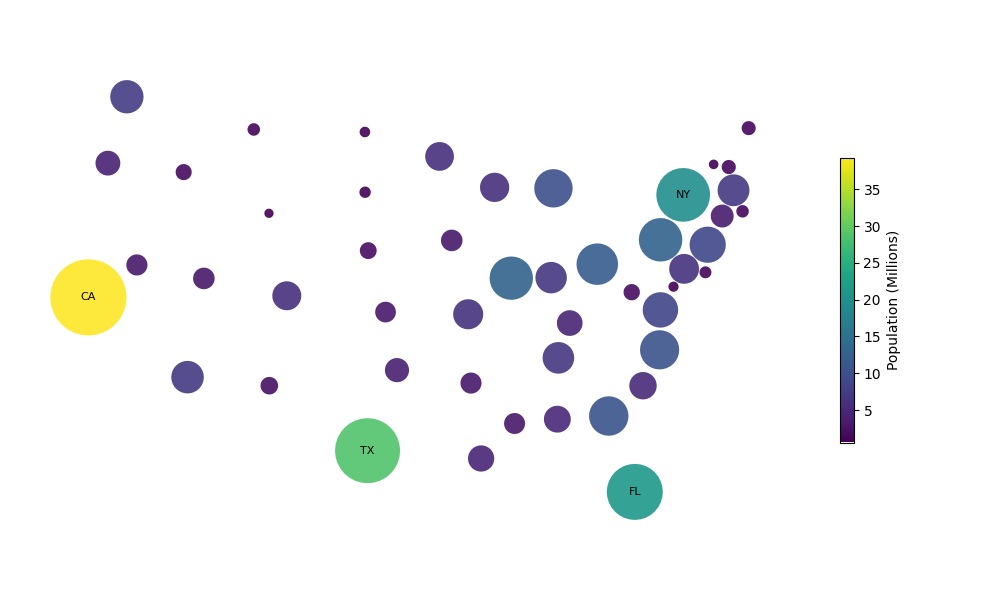
Create a symbol cartogram with symbols placed at the centroids of the original geometries.
Load data and create the symbol cartogram.
import matplotlib.pyplot as plt

import carto_flow.data as examples
import carto_flow.symbol_cartogram as smb

us_states = examples.load_us_census(population=True)

# place symbols at the state centroids and remove overlap
symbol_carto = smb.centroid_cartogram(
    us_states,
    # provide a column for proportional sizing of the symbols
    "Population",
)
Plot the symbol cartogram
fig, ax = plt.subplots(1, 1, figsize=(10, 6))

_ = symbol_carto.plot(
    ax=ax,
    # color by population size
    column="Population (Millions)",
    # shrink the colorbar
    legend_kwds={"shrink": 0.5},
    # label the largest states
    # the abbreviation column comes from the bundled census snapshot
    label=[
        row["State Abbreviation"] if row["State Abbreviation"] in ["CA", "TX", "FL", "NY"] else ""
        for _, row in us_states.iterrows()
    ],
)

plt.tight_layout()
Total running time of the script: ( 0 minutes 0.155 seconds)
Download Python source code: plot_symbol_centroid_layout.py
Download Jupyter notebook: plot_symbol_centroid_layout.ipynb