Edge curves
The edges of the prototile can be replaced by curves. The copies of the prototile still fit together, because the curve of an edge is the curve of the edge it is matched with. This page describes how curves are defined, how the shape of an edge constrains them, how they are sampled, when a curved prototile is valid, and how to save and draw a curved tiling.
Defining curves
A curve is given on the canonical edge, the segment from (0, 0) to (1, 0), by a list of control points that starts
at (0, 0) and ends at (1, 0). The side y > 0 is the left of the direction from (0, 0) to (1, 0). A curve
belongs to an edge shape id (TilingType.edge_shape_ids): every edge with that id gets the curve, placed on the edge
by IsohedralTiling.edge_transforms and reversed where IsohedralTiling.edge_reversed is true. Edge shape ids without
a curve stay straight.
import numpy as np

from isotile import IsohedralTiling, check_prototile, get_type

print(get_type(28).shape_types, get_type(28).edge_shape_ids.tolist())

curves = {
    0: [(0, 0), (0.25, 0.12), (0.5, 0), (0.75, -0.12), (1, 0)],
    1: [(0, 0), (0.3, 0.1), (0.7, 0.1), (1, 0)],
    2: [(0, 0), (0.35, -0.12), (0.6, -0.12), (1, 0)],
}
curved = IsohedralTiling(28, edge_curves=curves)
print(len(curved.prototile()), "points on the outline,", curved.area)
The shape ids of IH28 are 0 for the first edge and 1 and 2 for the two pairs of edges after it. The curves are
available as edge_curves, edge_curve_modes and, edge by edge, edges, a tuple of EdgeInfo with the index, shape
id, shape, reversal and curve of each edge. with_edge_curves(curves) returns a copy with other curves, and
rotated, scaled and with_frame keep the curves; with_frame and fill_region do not check the prototile again,
because a frame does not change validity.
An edge shape id of a straight (I) edge cannot have a curve; giving one raises ValueError, as does a curve that
does not run from (0, 0) to (1, 0).
Edge shapes
The shape of an edge restricts its curve. A curve with m control points has the point k and the point m - 1 - k
paired.
| Shape | Constraint | Paired points |
|---|---|---|
I |
The segment from (0, 0) to (1, 0). |
|
J |
None. | |
U |
Mirror symmetric about the perpendicular bisector x = 0.5. |
(x, y) and (1 - x, y) |
S |
Symmetric under a rotation by 180 degrees about (0.5, 0). |
(x, y) and (1 - x, -y) |


The pairing is by position in the list, not by coordinates, so a curve may turn back in x. enforce_symmetry(points,
shape) is the projection onto the curves of a shape: it keeps the first half of the points (k < m // 2), replaces
the second half by the images of the first half, and moves the middle point of an odd number of points onto the axis
(U: x = 0.5) or onto the center (S: (0.5, 0)). J returns the points, I the segment.
is_symmetric(points, shape) tests the constraint. The projection is idempotent: applying it to its own result
returns the same array, and a curve that already satisfies the constraint is returned unchanged.
from isotile import enforce_symmetry, is_symmetric

raw = [(0, 0), (0.2, 0.1), (0.4, 0.3), (0.9, 0.9), (1, 0)]
u_curve = enforce_symmetry(raw, "U")
s_curve = enforce_symmetry(raw, "S")
print(u_curve.tolist())
print(s_curve.tolist())
assert is_symmetric(u_curve, "U") and not is_symmetric(u_curve, "S")
assert np.array_equal(enforce_symmetry(u_curve, "U"), u_curve)
The constructor and check_prototile apply enforce_symmetry to the curves they receive, so edge_curves always
holds curves that satisfy their shape. EdgeShape.from_points(shape, points, mode) does the same for a single curve.
Interpolation
The control points are joined by one of two modes, set per shape id with edge_curve_modes:
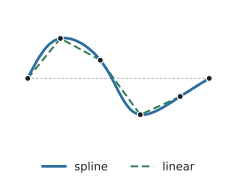
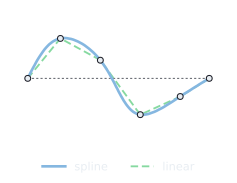
"spline"(default): a parametric natural cubic spline through the control points. The parameter is the cumulative chord length scaled to[0, 1], so the curve can turn back inx.interpolate(points, "spline", n_points)evaluates it atn_pointsequally spaced parameters; the default ismax(100, 10 * m)formcontrol points. The samples keep the symmetry of the control points. Consecutive control points that coincide count once."linear": the control points themselves, joined by straight segments.
from isotile import interpolate

points = [(0, 0), (0.3, 0.2), (0.7, -0.2), (1, 0)]
print(interpolate(points).shape, interpolate(points, n_points=20).shape, interpolate(points, "linear").shape)
The curved prototile and its tiles
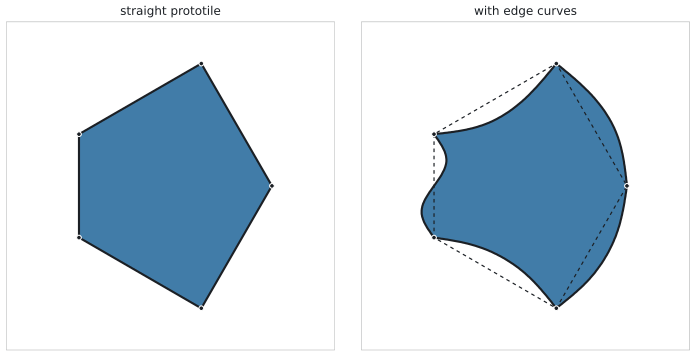
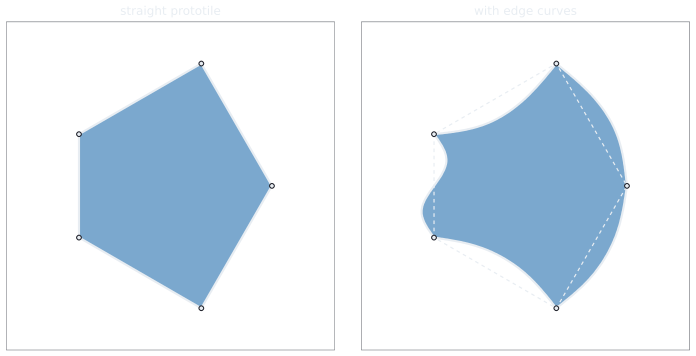
IsohedralTiling.prototile() returns the closed outline in world coordinates: the vertices with every curved edge
replaced by its samples. It starts at vertex 0 and runs along the edges in order, without repeating the first point.
prototile(curved=False) and vertices are the straight polygon; edge_outlines() returns one polyline per edge,
from vertex i to vertex i + 1. The number of samples of a spline edge is n_points, by default as in
interpolate. A frame maps the outline like the vertices. area, centroid and inscribed_radius refer to the
straight prototile; the curved prototile has the same area.
The tiles of a TileSet follow the same rule. TileSet.outlines() returns an (n, M, 2) array with the outline of
every tile, and TileSet.polygons() the tiles as shapely polygons (shapely extra); both take curved=False for the
straight tiles. TileSet.vertices() is always the straight polygon. Curves do not change which tiles are adjacent:
TileSet.adjacency is the same for any valid curves.
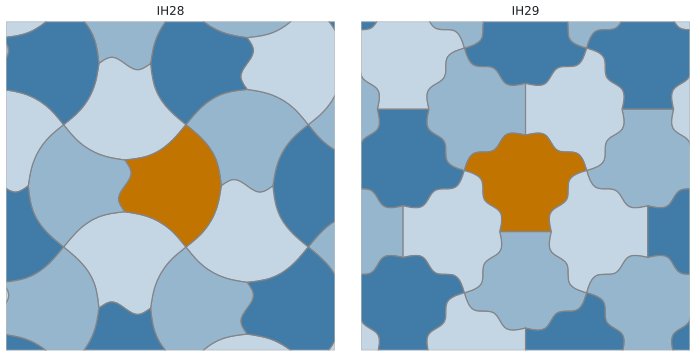
tiles = curved.fill_region((0, 0, 8, 6), n_tiles=30)
outlines = tiles.outlines()
print(outlines.shape, len(tiles.adjacency("edge").nonzero()[0]))
Tiles at the boundary of a region
cover and fill_region can select tiles by the overlap of their straight polygon with the region. The curves of a
tile that does not overlap the region can still reach into it, so with margin=0 the returned tiles would leave
slivers along the boundary of the region uncovered. The argument outline sets the polygon that is tested.
"curved" tests the polygon with the edge curves: every tile that overlaps the region is returned and the region is
covered completely. "straight" tests the straight polygon. The default None means "curved" if the tiling has an
edge curve, that is, edge_curves has at least one entry, and "straight" otherwise; a tiling without edge curves
takes the straight test whatever outline is.
The curved test returns the tiles that reach into the region only through their curves (the region includes the margin
band when margin is positive; the default is margin=0.0), and takes longer, because the curved polygons of the
tiles along the boundary are clipped. outline="straight" restores the straight test for a curved tiling.
tiles = curved.fill_region((0, 0, 8, 6), n_tiles=30)  # outline="curved" for a tiling with edge curves
straight_tiles = curved.fill_region((0, 0, 8, 6), n_tiles=30, outline="straight")
Validity
A curved prototile is valid when
- the straight prototile of the same parameters is valid,
- its outline is a simple closed curve with positive area, and
- parts of the outline that are not directly consecutive are at least
1e-6 * diameterapart, where the diameter is the larger side of the bounding box of the outline in native coordinates.
Touching or nearly touching parts of the outline are therefore invalid. No other condition is needed: the curve of an edge is the curve of its partner edge, so tiles that are adjacent in the straight tiling fit along every shared edge, they do not overlap, and the union of the tiles is the plane. The area of the curved prototile equals the area of the straight prototile, and the adjacency of the tiles is the one of the straight tiling.
The test is exact for the curve, not for a sampled polyline: a spline is tested as its cubic pieces and a linear curve
as its segments, so the result does not depend on n_points, which only sets how finely the outline is drawn. Pieces
that are directly consecutive may share their join, and the two halves of one piece may share their middle point; the
other parts must keep the clearance. A curve may therefore turn by 180 degrees or more within one piece (a hairpin)
as long as its arms are at least the clearance apart. The outline is invalid if a loop, a crossing or a cusp brings
two parts closer than the clearance, if the tangent turns by 180 degrees or more at a join (the curve folds back and
the two pieces overlap along a stretch), if a piece has zero length, or if two other parts come closer than the
clearance. Validity does not depend on the frame; it is judged in native coordinates.
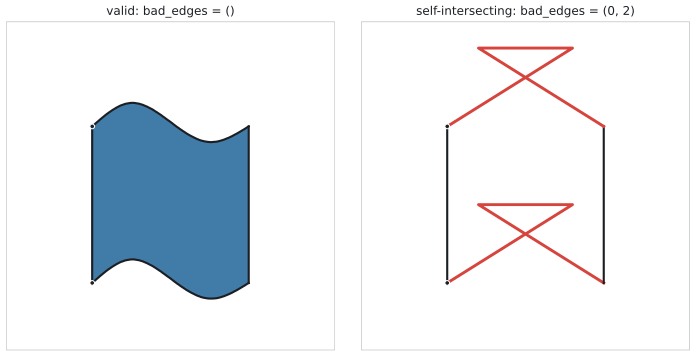
check_prototile(tiling_type, parameters, edge_curves=..., edge_curve_modes=...) returns a PrototileReport without
building a tiling: valid, the sorted bad_edges (edges whose curves cross, touch, come closer than the clearance or fold back) and a message. The
constructor, with_parameters, with_edge_curves and the parameters setter apply the same test and raise
InvalidPrototileError, a subclass of ValueError whose report attribute is the PrototileReport, when it fails; the
setter keeps the previous state. Curves can be valid in the spline mode and invalid in the linear mode, and the other way round.
bow = {0: [(0, 0), (0.8, 0.5), (0.2, 0.5), (1, 0)]}
report = check_prototile(41, edge_curves=bow, edge_curve_modes={0: "linear"})
print(report.valid, report.bad_edges)
print(report.message)

try:
    IsohedralTiling(41, edge_curves=bow, edge_curve_modes={0: "linear"})
except ValueError as error:
    print("rejected:", error)
    print(error.report.bad_edges)
bad_edges names are red.Presets
edge_curve_preset(name, shape, amplitude) returns the control points of a named curve for any edge shape, with the
constraint of the shape enforced. list_edge_curve_presets() lists the names: straight, bump, dent, wave and
s_curve. The curve is built for a free edge and then projected, so a wave on a U edge becomes two bumps.
edge_curves_from_preset(tiling_type, name, amplitude) returns the curve for every shape id of a type that can be
curved.
from isotile import edge_curve_preset, edge_curves_from_preset, list_edge_curve_presets

print(list(list_edge_curve_presets()))
wavy = IsohedralTiling(66, edge_curves=edge_curves_from_preset(66, "wave", 0.06))
print(sorted(wavy.edge_curves), edge_curve_preset("bump", "U", 0.1).shape)
Whether a preset gives a valid prototile depends on the type and the amplitude; test it with check_prototile.
list_presets() lists 15 named tilings (type, parameters and curves) and IsohedralTiling.from_preset(name) builds
one; keyword arguments replace the preset's parameters, edge_curves, edge_curve_modes or frame.
from isotile import list_presets

print(list(list_presets()))
flowers = IsohedralTiling.from_preset("flowers")
Saving and loading
IsohedralTiling.to_dict() returns a JSON-compatible dict with the type, parameters, edge curves, edge curve modes and,
unless it is the identity, the frame. from_dict reads it back, save(path) writes it as JSON and load(path) reads
the file. The output is deterministic and a tiling read back has the same type, parameters, curves, modes and frame.
The format is described in isotile.io. Version 1.0 files, which have no modes, are read with the spline mode for
every curve, and unknown keys are ignored.
data = curved.to_dict()
again = IsohedralTiling.from_dict(data)
assert np.array_equal(again.prototile(), curved.prototile())
print(list(data))
Plotting
isotile.plot has two helpers for matplotlib, which is an optional dependency (pip install isotile[plot]) that
is imported when a function is called. plot_prototile(tiling, ax=None, show_labels=True) draws the outline, the
straight prototile dashed when there are curves, and the index and shape of every edge with an arrow in the direction
of the canonical edge. plot_tiles(tiles, ax=None, color="coloring") draws curved tiles colored by the coloring of the
type, by aspect or in one color.