Concepts
Isohedral tilings
A tiling of the plane is isohedral when all its tiles are congruent and the symmetries of the tiling map any tile onto
any other tile. Each tile is a copy of one shape, the prototile. Grünbaum and Shephard classified the isohedral tilings
into 93 types, numbered IH1 to IH93. isotile provides the 81 types of
tactile, with its numbers and parameter format; tiling_types() lists the
numbers.
A type fixes how the prototile is built from vertices, which of its edges are related by the symmetries, and how the copies are placed. It does not fix the size of the prototile: most types have free parameters that move its vertices.
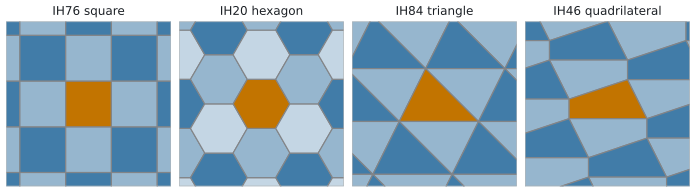
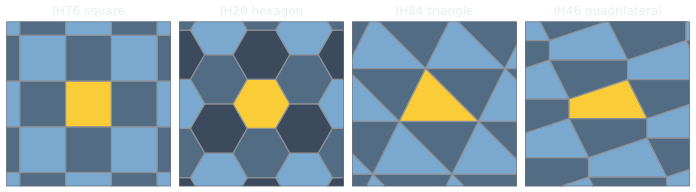
The constructors IsohedralTiling.square, hexagon, triangle and quadrilateral build tilings of four common
families, which are the types 76, 20, 84 and 46.
Free parameters
A type has between 0 and 6 parameters (TilingType.n_params). Each vertex of the prototile is an affine function of
the parameters, so a parameter set determines the outline. Types without parameters, such as the square (IH76) and the
regular hexagon (IH20), have one fixed shape.
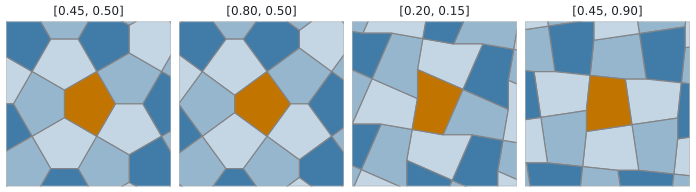
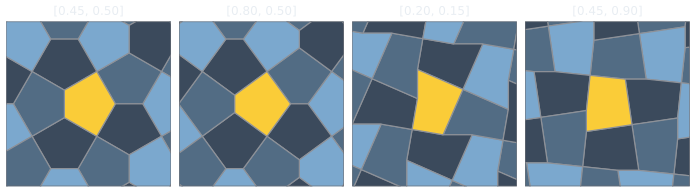
Not every parameter set gives a prototile that can be drawn: the outline can cross itself or collapse. The
constructor of IsohedralTiling raises ValueError for such a set, and check_prototile returns a PrototileReport
with the edges at fault. TilingType.safe_ranges gives for each parameter the interval around the default in which
the prototile stays valid while the other parameters keep their defaults. It is a one-parameter slice, not the valid
region; the test for a combination of values is check_prototile.
The lattice, cells and aspects
The tiling repeats under two translations, translation_u and translation_v. Shifting the whole tiling by
u * translation_u + v * translation_v, for any integers u and v, maps it onto itself. These vectors define a
lattice: the points u * translation_u + v * translation_v plus a fixed anchor point, which is the origin (0, 0) of
the native coordinates of the type.
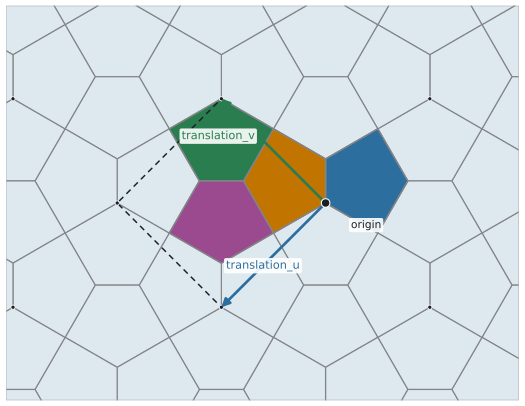
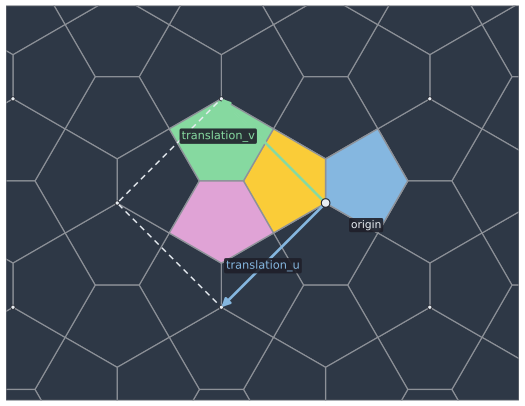
u * translation_u + v * translation_v. The four colored tiles are the cell (0, 0); the dashed parallelogram is spanned by the two vectors at the origin.A cell is the group of TilingType.n_aspects tiles that belongs to one lattice point. It is identified by the integers
(u, v) of the point. The tiles of cell (u, v) are the tiles of cell (0, 0) shifted by
u * translation_u + v * translation_v, and every tile of the tiling is in exactly one cell. The parallelogram spanned
by the two vectors at a lattice point is only a drawing aid: the tiles of a cell can lie partly or entirely outside it
and need not touch its corners.
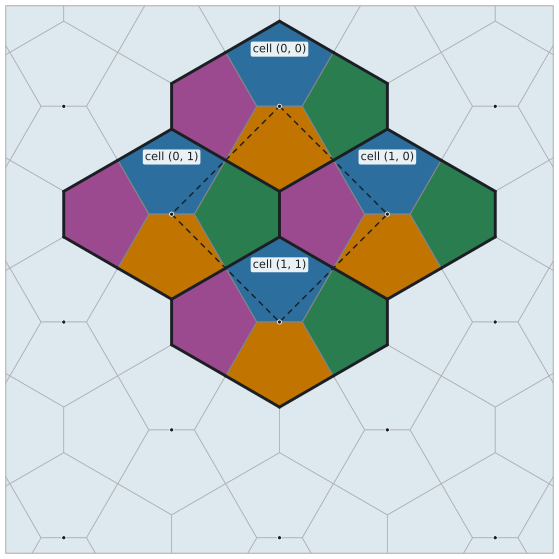
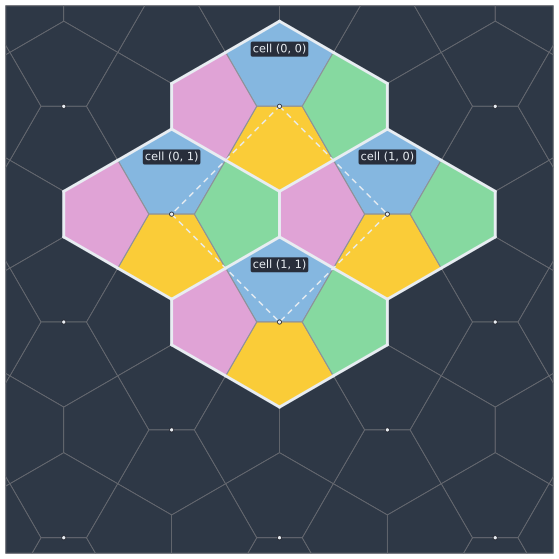
(0, 0), (1, 0), (0, 1) and (1, 1), outlined by thick lines. Each is the first group shifted by a lattice vector; the colors show the aspect.Where the anchor point lies relative to the prototile depends on the type. In 63 of the 81 types it is a vertex of the prototile (IH28), in 4 it lies on an edge (IH29) and in 14 elsewhere (IH20, the regular hexagon, is one of them). The tiles of a cell therefore lie near their lattice point, not inside the parallelogram.
The index of a tile within its cell is its aspect, from 0 to n_aspects - 1 (between 1 and 12). An aspect is a placement
of the prototile: an affine map that can include a rotation or a reflection (TilingType.has_reflections). The tile
with cell (u, v) and aspect a is the prototile mapped by
- the affine map of aspect
a(IsohedralTiling.aspects[a]), followed by - the translation by
u * translation_u + v * translation_v.
In native coordinates the map of aspect 0 is the identity, so the tile with cell (0, 0) and aspect 0 is the prototile itself.
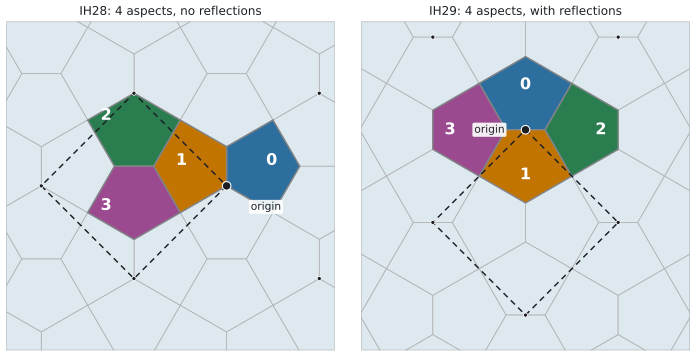
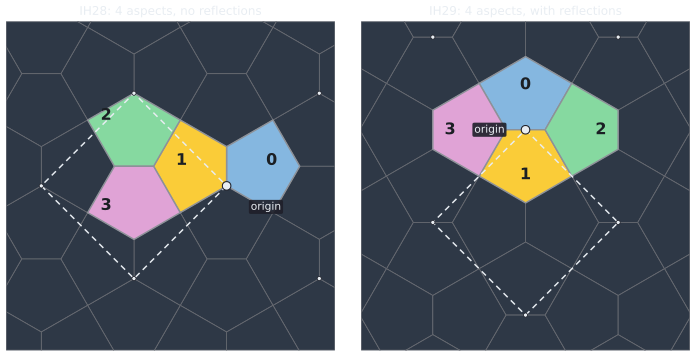
(0, 0), one color per aspect and labeled with the aspect index, and the origin. IH28 has 4 aspects without reflections; IH29 has 4 aspects and has_reflections is true. The dashed parallelogram is the cell.A TileSet stores exactly this: cell has shape (n, 2), aspect has shape (n,) and transforms has shape
(n, 2, 3), the affine map of the prototile onto each tile. Two tiles are the same tile when cell and aspect agree. The
tiles that cover and fill_region return are sorted by u, then v, then aspect, and IsohedralTiling.tiles(cell,
aspect) builds the tiles of given cells and aspects directly.
The straight prototile and edge shapes
The straight prototile is the polygon through the vertices of the type, with straight edges. IsohedralTiling.vertices,
prototile(curved=False) and TileSet.vertices() are this polygon, and so is the polygon that validity
(check_prototile), the area, the centroid and the inscribed radius refer to.
The edges of the prototile can be replaced by curves without breaking the tiling, as long as the curves obey the
constraint of the edge shape. Each edge has one of four shapes (TilingType.edge_shapes):
| Shape | Constraint on the curve |
|---|---|
I |
Straight; the edge cannot be changed. |
J |
Free curve. |
U |
Mirror symmetric about the perpendicular bisector of the edge. |
S |
Symmetric under a rotation by 180 degrees about the midpoint of the edge. |
Edges that belong together share a shape id (TilingType.edge_shape_ids): the edges of one id have the same curve,
possibly traversed in the opposite direction (IsohedralTiling.edge_reversed). IsohedralTiling.edge_transforms maps
the canonical edge from (0, 0) to (1, 0) onto each edge of the prototile (in world coordinates), so a curve defined
on the canonical edge can be placed on the edge.
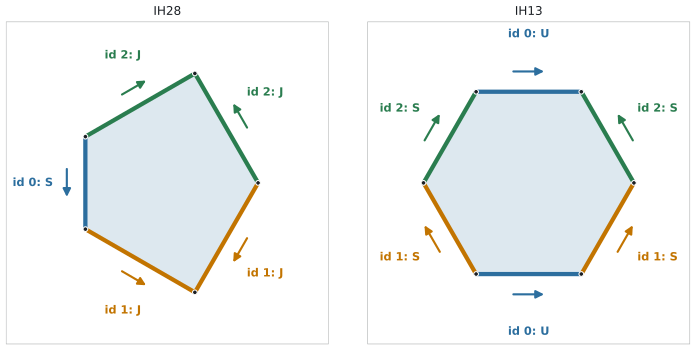
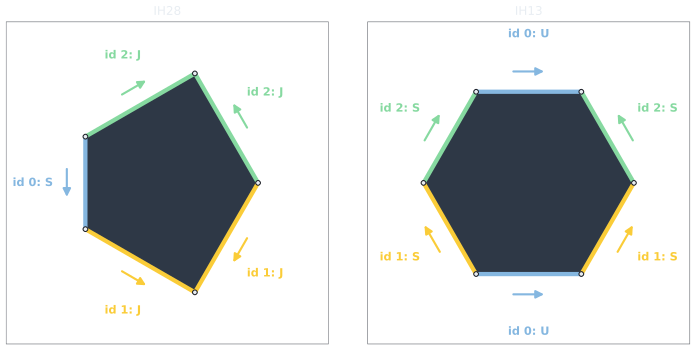
(0, 0) to (1, 0) of the canonical edge; against the order of the vertices, the edge is reversed.IsohedralTiling(number, edge_curves=...) replaces the edges by curves, and prototile() and TileSet.outlines() then
return the curved outlines. The Edge curves page describes the curves, their symmetry, sampling and
validity.
Frames
The vertices, translations and aspects of a type are defined in its native coordinates. The frame of an
IsohedralTiling is an affine map of shape (2, 3) from the native coordinates to world coordinates: it scales,
rotates, reflects and positions the tiling. It is applied to the vertices, the translation vectors, the aspects and
the edges, so everything derived from the tiling is in world coordinates. The default frame is the identity. The frame
does not change which parameter sets are valid or which tiles are adjacent.
rotated(angle_degrees) and scaled(factor) return copies with the frame composed with a rotation or scaling about
the world origin; with_frame(frame) replaces it.
Selecting the tiles of a region
Three methods turn a rectangle into a TileSet:
fill(bounds)
: The scanline fill of tactile. Every cell whose origin lies in the rectangle contributes all its aspects, in
scanline order. Tiles near the boundary can reach outside the rectangle, and tiles outside it can reach in, so
the result does not guarantee that the rectangle is covered.
cover(bounds, outline=None)
: Every tile whose polygon overlaps the rectangle with positive area, exactly. A tile that only touches the
rectangle at a point or along an edge is not included. The rectangle must have positive width and height.
outline sets the polygon of the tile that is tested: "straight" is the straight-edge polygon, "curved" the
polygon with the edge curves, which includes tiles whose curves reach into the rectangle (see
Tiles at the boundary of a region). The default None means
"curved" if the tiling has an edge curve and "straight" otherwise.
fill_region(bounds, n_tiles=... | tile_size=..., margin=..., outline=...)
: Sets the scale and position of the frame from the region and calls cover. The region is bounds, grown by
margin times its width on the left and right and by margin times its height at the top and bottom. With
n_tiles, the tile area is the region area divided by n_tiles, so the number of tiles that fit into the region
is n_tiles and the tiles along the boundary that reach in come on top. With tile_size, the tile area is
tile_size ** 2. The orientation of the frame (its linear part up to scale) is kept; the native origin is placed
at the center of the region. The tile set is cover of the region (with the same outline), so with outline=None or "curved" it covers the region completely.
Because the lattice is anchored at the center of the region, a region that is expanded by the same amount on all
four sides keeps the lattice at the same tile size: every tile of the region is a tile of the expanded region.
To anchor the lattice elsewhere, pass offset=(u, v): the anchor is the region center plus
u * translation_u + v * translation_v of the placed tiling, and the tiles are selected in one pass. An offset
that changes u or v by an integer gives the same tile set, so (0.5, 0.5) is the half-cell shift for every
type; an offset in units of the tile size along x and y is not periodic for the hexagon and the triangle tilings.
For the tiles of a given tiling at its own scale, use cover; use fill_region when the tile count or size is the
quantity to set.